Resources
Contents
- Resources
- Search resources
- Sound resources
- Sound Instance
- Sound Analysis
- Similar Sounds
- Sound Comments
- Download Sound (OAuth2 required)
- Upload Sound (OAuth2 required)
- Describe Sound (OAuth2 required)
- Pending Uploads (OAuth2 required)
- Edit Sound Description (OAuth2 required)
- Bookmark Sound (OAuth2 required)
- Rate Sound (OAuth2 required)
- Comment Sound (OAuth2 required)
- User resources
- Pack resources
- Other resources
Search resources
Warning
When using the search resources make sure to include the fields parameter (see Response (sound list))
so that you get all needed metadata for each search result in a single request. In this way you’ll avoid having to perform
one extra API request to retrieve the desired metadata for each individual result.
Search
GET /apiv2/search/
Note
Note that this search endpoint replaces the deprecated /apiv1/search/text endpoint (deprecated in November 2025).
While the old endpoint currently redirects here, users are advised to update their integrations to call this endpoint directly.
This resource allows searching for sounds in Freesound by matching user metadata (e.g. tags, username), precomputed content-based descriptors, and other kinds of metadata.
Parameters
Search queries are defined using the following parameters:
| Name | Type | Description |
|---|---|---|
| query | string | The query! The query is the main parameter used to define a query. You can type several terms separated by spaces or phrases wrapped inside quote ‘”’ characters. For every term, you can also use ‘+’ and ‘-’ modifier characters to indicate that a term is “mandatory” or “prohibited” (by default, terms are considered to be “mandatory”). For example, in a query such as query=term_a -term_b, sounds including term_b will not match the search criteria. The query does a weighted search over some sound properties including sound tags, the sound name, its description, pack name and the sound id. Therefore, searching for query=123 will find you sounds with id 1234, sounds that have 1234 in the description, in the tags, etc. You’ll find some examples below. Using an empty query (query= or query="") will return all Freesound sounds. |
| filter | string | Allows filtering query results. See below for more information. |
| sort | string | Indicates how query results should be sorted. See below for a list of the sorting options. By default sort=score. |
| similar_to | integer or array[float] | Allows finding sounds similar to a given sound. You can pass the ID of a sound (integer) or a similarity vector (array of floats separated by commas) and the results will be sorted by their similarity to this sound. |
| similar_space | string | Indicates the similarity space used when performing similarity search. If not defined, the default similarity space is used. |
| group_by_pack | bool (yes=1, no=0) | This parameter represents a boolean option to indicate whether to collapse results belonging to sounds of the same pack into single entries in the results list. If group_by_pack=1 and search results contain more than one sound that belongs to the same pack, only one sound for each distinct pack is returned (sounds with no packs are returned as well). However, the returned sound will feature two extra properties to access these other sounds omitted from the results list: n_from_same_pack: indicates how many other results belong to the same pack (and have not been returned) more_from_same_pack: uri pointing to the list of omitted sound results of the same pack (also including the result which has already been returned). See examples below. By default group_by_pack=0. |
| weights | string | Allows definition of custom weights when matching queries with sound metadata fields. You should most likely never use that :) |
| fields | strings (comma separated) | Indicates which sound properties should be included in every sound of the response. Sound properties can be any of those listed in Response (sound instance) (plus an additional field score which returns a matching score added by the search engine), and must be separated by commas. By default fields=id,name,tags,username,license. Use this parameter to optimize request time by only requesting the information you really need. |
| page | string | Query results are paginated, this parameter indicates what page should be returned. By default page=1. |
| page_size | string | Indicates the number of sounds per page to include in the result. By default page_size=15, and the maximum is page_size=150. Note that with bigger page_size, more data will need to be transferred. |
The ‘filter’ parameter
Search results can be filtered by specifying a series of properties that sounds should match.
In other words, using the filter parameter you can specify the value that certain sound fields should have in order to be considered valid search results.
Filters are defined with a syntax like filter=filtername:value filtername:value (that is the Solr filter syntax).
For multi-word queries, the values must be enclosed in double quotes and separated by spaces (filter=filtername:"val ue").
Available filters
Filter names can be any of the field names listed in the tables of the Sound Instance resource that are marked with “yes” in the filtering column.
The first table includes fields/filters corresponding to user-provided metadata and general sound metadata.
Additionally, content-based fields/filters from the second table can be used when narrowing down a query.
Using content-based descriptors as filters enables content-based search in Freesound.
Note: The fields tags and comments are named tag and comment in filters (singular instead of plural)!
The fields pack and comments normally return a URI (type=URI) when accessed as metadata,
whereas their corresponding filters expect string values (type=string) and can match individual target words.
Additioanlly, the filters associated with the fields name, description, tags, and comments use tokenization.
This means that these filters accept string values (words), and a match occurs if a sound contains that word anywhere in the corresponding field’s data.
Filtering operators
For numeric or integer filters, rather than specifying a single value, a range can be used using the following syntax (the “TO” must be uppercase!):
filter=filtername:[start TO end]
filter=filtername:[* TO end]
filter=filtername:[start to \*]  (NOT valid)
Note: It is recommended to use ranges when using filters with numeric values (which may be floats). This is especially useful for many content-based filters, as exact value matches for floats are uncommon.
Dates can also have ranges and math operations (the “TO” must still be uppercase!):
filter=created:[* TO NOW]
filter=created:[1976-03-06T23:59:59.999Z TO *]
filter=created:[1995-12-31T23:59:59.999Z TO 2007-03-06T00:00:00Z]
filter=created:[NOW-1YEAR/DAY TO NOW/DAY+1DAY]
filter=created:[1976-03-06T23:59:59.999Z TO 1976-03-06T23:59:59.999Z+1YEAR]
filter=created:[1976-03-06T23:59:59.999Z/YEAR TO 1976-03-06T23:59:59.999Z]
Simple logic operators can also be used in filters:
filter=type:(wav OR aiff)
filter=description:(piano AND note)
See below for some Examples on different types of filters!
Filter queries using geotagging data
Search also supports filtering query results using geotagging data. For example, you can retrieve sounds that were recorded near a particular location or filter the results of a query to those sounds recorded in a geospatial area. Note that not all sounds in Freesound are geotagged, and the results of such queries will only include geotagged sounds. In general, you can define geotagging queries in two ways:
1) By specifying a point in space and a maximum distance: this way lets you specify a latitude and longitude target point, and a maximum distance (in km) from that point. Query results will only include those points contained in the area. You can use the
filterparameter of a standard query to specify latitude, longitude and maximum distance using the following syntax:filter={!geofilt sfield=geotag pt=<LATITUDE>,<LONGITUDE> d=<MAX_DISTANCE_IN_KM>}2) By specifying an arbitrary rectangle in space: this way lets you define a rectangle in space by specifying a minimum latitude and longitude, and a maximum latitude and longitude. Query results will only include those points contained in the area. You can use the
filterparameter of a standard query to specify minimum and maximum latitude and longitude using the following syntax:filter=geotag:["<MINIMUM_LATITUDE>, <MINIMUM_LONGITUDE>" TO "<MAXIMUM_LONGITUDE> <MAXIMUM_LATITUDE>"]Minimum and maximum latitude and longitude define the lower left and upper right corners of the rectangle as shown below. Besides
Intersects, you can also useIsDisjointTo, which will return all sounds geotagged outside the rectangle.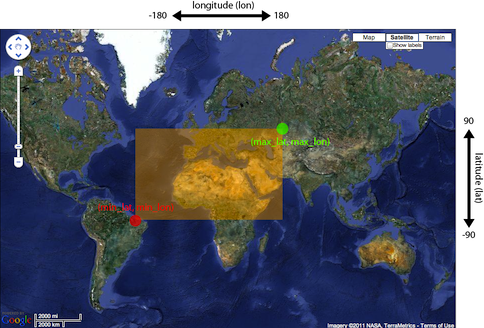
Please refer to the Solr documentation on spatial queries for extra information (http://wiki.apache.org/solr/SolrAdaptersForLuceneSpatial4) and check the examples below.
The ‘sort’ parameter
The sort parameter determines how the results are sorted, and can only be one
of the following.
| Option | Explanation |
|---|---|
| score | Sort by a relevance score returned by our search engine (default). |
| duration_desc | Sort by the duration of the sounds, longest sounds first. |
| duration_asc | Same as above, but shortest sounds first. |
| created_desc | Sort by the date of when the sound was added. newest sounds first. |
| created_asc | Same as above, but oldest sounds first. |
| downloads_desc | Sort by the number of downloads, most downloaded sounds first. |
| downloads_asc | Same as above, but least downloaded sounds first. |
| rating_desc | Sort by the average rating given to the sounds, highest rated first. |
| rating_asc | Same as above, but lowest rated sounds first. |
The ‘similar_to’ and ‘simiarity_space’ parameters
These parameters allow similarity-based search in order to retrieve sounds that are acoustically, semantically, or perceptually similar to a given reference sound.
The similar_to parameter takes the ID of a sound (e.g. 1234) or a similarity vector (e.g. [1.36, 2.05, ..]) and returns results sorted by similarity to that sound. For example:
similar_to=<SOUND_ID>&similarity_space=<SIMILARITY_SPACE_NAME>
When using a sound ID, it should be a valid Freesound ID corresponding to a sound that exists. When using a similarity vector, it should be obtained by extracting the a feature representation for a sound corresponding to the used similarity space (see below).
The similarity_space parameter can optionally be used (in combination with similar_to) to indicate which feature space should be used for computing similarity.
Each similarity space is built using different types of descriptors, ranging from low-level acoustic characteristics to semantically informed or perceptual sound information.
If the similarity_space parameter is not specified, the default space is used. These are the similarity spaces which are currently available:
| Similarity space name | Number of dimensions | Explanation |
|---|---|---|
| laion_clap | 512 | This space is built using LAION-CLAP embeddings, which designed to capture both acoustic and semantic properties of sounds. We use L2-normed versions of the embeddings that can be extracted using the standard tools provided by LAION organisation (https://github.com/LAION-AI/CLAP). We use the 630k-audioset-fusion-best.pt pre-trained model. |
| freesound_classic | 100 | This space is built using a combination of low-level acoustic audio features extracted using the FreesoundExtractor from the Essentia audio analysis library (https://essentia.upf.edu). We currently don’t provide code to extract these features from arbitrary audio, but we might do that in the future. |
When using vectors as input for the similar_to parameter, make sure that the vectors are extracted using the same method as the one used to build the similarity space.
Note that L2-normalisation is automatically applied to input vectors.
If the provided vector is already L2-normalized, this will have no effect.
The ‘weights’ parameter
The weights parameter can be used to define custom weights when matching queries with sound metadata fields. You can use any of the field names listed above
(although some might not make sense when preparing a query) and specify integer weights for each field using the following syntax:
weights=field_name:integer_weight,field_name2:integer_weight2
If the format is not correct, custom weights will not be applied.
The default weights are something like id:4,tag:4,description:3,original_filename:2,username:2,pack:2.
The ‘fields’ parameter
The fields parameter defines the sound information that is returned for every sound in the results.
If fields is not specified, a minimal set of information for every sound result is returned by default.
This includes the ID of the sound, the name and tags of the sound, the username of the sound uploader, and the license,
i.e. by default fields=id,name,tags,username,license.
When fields is specified, the default fields are not included and must be explicitly defined if needed.
For example, if fields=name,score,avg_rating,license is used, results will include sound name, search engine score relative to the query,
average rating, and license for every returned sound.
Response (sound list)
Search resource returns a sound list response. Sound list responses have the following structure:
{
  "count": <total number of results>,
  "next": <link to the next page of results (null if none)>,
  "results": [
      <sound result #1 info>,
      <sound result #2 info>,
      ...
      <sound result #page_size info>
  ],
  "previous": <link to the previous page of results (null if none)>
}
You can use the request parameters fields, page, and page_size to indicate what information should be returned for any sound in the list and the size/page number (see Parameters).
Examples
Simple search:
https://freesound.org/apiv2/search/?query=cars
https://freesound.org/apiv2/search/?query=piano&page=2
https://freesound.org/apiv2/search/?query=bass%20-drum
https://freesound.org/apiv2/search/?query="bass%20drum"%20-double
Search with a filter:
https://freesound.org/apiv2/search/?query=music&filter=tag:guitar
https://freesound.org/apiv2/search/?query=music&filter=type:(wav%20OR%20aiff)
https://freesound.org/apiv2/search/?query=music&filter=tag:bass%20tag:drum
https://freesound.org/apiv2/search/?query=music&filter=category:Music%20subcategory:"Solo%20instrument"
https://freesound.org/apiv2/search/?query=music&filter=is_geotagged:true%20tag:field-recording%20duration:%5B60%20TO%20120%5D
https://freesound.org/apiv2/search/?query=music&filter=samplerate:44100%20type:wav%20channels:2
https://freesound.org/apiv2/search/?query=music&filter=duration:%5B0.1%20TO%200.3%5D%20avg_rating:%5B3%20TO%20%2A%5D
Search with a content-based filter:
https://freesound.org/apiv2/search/?query=piano&filter=bpm:60
https://freesound.org/apiv2/search/?query=piano&filter=pitch:%5B435%20TO%20445%5D
https://freesound.org/apiv2/search/?query=piano&filter=note_name:E
https://freesound.org/apiv2/search/?query=piano&filter=note_confidence:%5B0.9%20TO%20%2A%5D
Simple search and selection of sound fields to return in the results:
https://freesound.org/apiv2/search/?query=alarm&fields=name,previews
https://freesound.org/apiv2/search/?query=alarm&fields=name,spectral_centroid,pitch
https://freesound.org/apiv2/search/?query=loop&fields=uri,onset_times
Group search results by pack:
https://freesound.org/apiv2/search/?query=piano&group_by_pack=1
Get geotagged sounds with tag field-recording. Return only geotag and tags for each result:
https://freesound.org/apiv2/search/?filter=is_geotagged:1%20tag:field-recording&fields=geotag,tags
Basic geospatial filtering:
https://freesound.org/apiv2/search/?filter=geotag:"Intersects(-74.093%2041.042%20-69.347%2044.558)"
https://freesound.org/apiv2/search/?filter=geotag:"IsDisjointTo(-74.093%2041.042%20-69.347%2044.558)"
Geospatial with customizable max error parameter (in degrees) and combinations of filters:
https://freesound.org/apiv2/search/?filter=geotag:"Intersects(-74.093%2041.042%20-69.347%2044.558)%20distErr=20"
https://freesound.org/apiv2/search/?filter=geotag:"Intersects(-80%2040%20-60%2050)"%20OR%20geotag:"Intersects(60%2040%20100%2050)"&fields=id,geotag,tags
https://freesound.org/apiv2/search/?filter=(geotag:"Intersects(-80%2040%20-60%2050)"%20OR%20geotag:"Intersects(60%2040%20100%2050)")%20AND%20tag:field-recording&fields=id,geotag,tags
Geospatial search for points at a maximum distance d (in km) from a latitude,longitude position and with a particular tag:
https://freesound.org/apiv2/search/?filter=%7B%21geofilt%20sfield=geotag%20pt=41.3833,2.1833%20d=10%7D%20tag:barcelona&fields=id,geotag,tags
Content Search (deprecated)
GET /apiv2/search/content/
POST /apiv2/search/content/
This resource allows searching sounds in Freesound based on their content descriptors.
Warning
As of December 2023, this resource is deprecated and will be removed in the comming months. Similar functionality will be achievable using the Search resource. Documentation about how to do this will be added in due time but in the meantime, please contact us if you need help with this.
Parameters (content search parameters)
Content search queries are defined using the following request parameters:
| Name | Type | Description |
|---|---|---|
| target | string or numeric | This parameter defines a target based on content-based descriptors to sort the search results. It can be set as a number of descriptor name and value pairs, or as a sound id. See below. |
| analysis_file | file | Experimental - Alternatively, targets can be specified by uploading a file with the output of the Essentia Freesound Extractor analysis of any sound that you analyzed locally (see below). This parameter overrides target, and requires the use of POST method. |
| descriptors_filter | string | This parameter allows filtering query results by values of the content-based descriptors. See below for more information. |
The ‘target’ and ‘analysis_file’ parameters
The target parameter can be used to specify a content-based sorting of your search results.
Using target you can sort the query results so that the first results will be the sounds featuring the most similar descriptors to the given target.
To specify a target you must use a syntax like target=descriptor_name:value.
You can also set multiple descriptor/value pairs in a target separating them with spaces (target=descriptor_name:value descriptor_name:value).
Descriptor names must be chosen from those listed in Audio Descriptors Documentation.
Only numerical descriptors are allowed.
Multidimensional descriptors with fixed-length (that always have the same number of dimensions) are allowed too (see below).
Consider the following two target examples:
(A) target=lowlevel.pitch.mean:220
(B) target=lowlevel.pitch.mean:220 lowlevel.pitch.var:0
Example A will sort the query results so that the first results will have a mean pitch as close to 220Hz as possible. Example B will sort the query results so that the first results will have a mean pitch as close to 220Hz as possible and a pitch variance as close as possible to 0. In that case example B will promote sounds that have a steady pitch close to 220Hz.
Multidimensional descriptors can also be used in the target parameter:
target=sfx.tristimulus.mean:0,1,0
Alternatively, target can also be set to point to a Freesound sound.
In that case the descriptors of the sound will be used as the target for the query, therefore query results will be sorted according to their similarity to the targeted sound.
To set a sound as a target of the query you must use the sound id. For example, to use sound with id 1234 as target:
target=1234
There is even another way to specify a target for the query, which is by uploading an analysis file generated using the Essentia Freesound Extractor.
For doing that you will need to download and compile Essentia (we recommend using release 2.0.1), an open source feature extraction library developed at the Music Technology Group (https://github.com/mtg/essentia/tree/2.0.1),
and use the ‘streaming_extractor_freesound’ example to analyze any sound you have in your local computer.
As a result, the extractor will create a JSON file that you can use as target in your Freesound API content search queries.
To use this file as target you will need to use the POST method (instead of GET) and attach the file as an analysis_file POST parameter (see example below).
Setting the target as an analysis_file allows you to to find sounds in Freesound that are similar to any other sound that you have in your local computer and that it is not part of Freesound.
When using analysis_file, the contents of target are ignored. Note that this feature is experimental. Some users reported not being able to generate compatible analysis files.
Note that if target (or analysis_file) is not used in combination with descriptors_filter, the results of the query will
include all sounds from Freesound indexed in the similarity server, sorted by similarity to the target.
The ‘descriptors_filter’ parameter
The descriptors_filter parameter is used to restrict the query results to those sounds whose content descriptor values match with the defined filter.
To define descriptors_filter parameter you can use the same syntax as for the normal filter parameter, including numeric ranges and simple logic operators.
For example, descriptors_filter=lowlevel.pitch.mean:220 will only return sounds that have an EXACT pitch mean of 220hz.
Note that this would probably return no results as a sound will rarely have that exact pitch (might be very close like 219.999 or 220.000001 but not exactly 220).
For this reason, in general it might be better to indicate descriptors_filter using ranges.
Descriptor names must be chosen from those listed in Audio Descriptors Documentation.
Note that most of the descriptors provide several statistics (var, mean, min, max…). In that case, the descriptor name must include also the desired statistic (see examples below).
Non fixed-length descriptors are not allowed.
Some examples of descriptors_filter for numerical descriptors:
descriptors_filter=lowlevel.pitch.mean:[219.9 TO 220.1]
descriptors_filter=lowlevel.pitch.mean:[219.9 TO 220.1] AND lowlevel.pitch_salience.mean:[0.6 TO *]
descriptors_filter=lowlevel.mfcc.mean[0]:[-1124 TO -1121]
descriptors_filter=lowlevel.mfcc.mean[1]:[17 TO 20] AND lowlevel.mfcc.mean[4]:[0 TO 20]
Note how in the last two examples the filter operates in a particular dimension of a multidimensional descriptor (with dimension index starting at 0).
descriptors_filter can also be defined using non numerical descriptors such as ‘tonal.key_key’ or ‘tonal.key_scale’.
In that case, the value must be enclosed in double quotes ‘”’, and the character ‘#’ (for example for an A# key) must be indicated with the string ‘sharp’.
Non numerical descriptors can not be indicated using ranges.
For example:
descriptors_filter=tonal.key_key:"Asharp"
descriptors_filter=tonal.key_scale:"major"
descriptors_filter=(tonal.key_key:"C" AND tonal.key_scale:"major") OR (tonal.key_key:"A" AND tonal.key_scale:"minor")
You can combine both numerical and non numerical descriptors as well:
descriptors_filter=tonal.key_key:"C" tonal.key_scale="major" tonal.key_strength:[0.8 TO *]
Response
The Content Search resource returns a sound list just like Response (sound list).
The same extra request parameters apply (page, page_size, fields, descriptors and normalized).
Examples
Setting a target as some descriptor values:
https://freesound.org/apiv2/search/content/?target=lowlevel.pitch.mean:220
https://freesound.org/apiv2/search/content/?target=lowlevel.pitch.mean:220%20AND%20lowlevel.pitch.var:0
Using multidimensional descriptors in the target:
https://freesound.org/apiv2/search/content/?target=sfx.tristimulus.mean:0,1,0&fields=id,analysis&descriptors=sfx.tristimulus.mean
Using a Freesound sound id as target:
https://freesound.org/apiv2/search/content/?target=1234
Using an Essentia analysis file as target:
curl -X POST -H "Authorization: Token {{your_api_key}}" -F analysis_file=@"/path/to/your_file.json" 'https://freesound.org/apiv2/search/content/'
Using descriptors filter:
https://freesound.org/apiv2/search/content/?descriptors_filter=lowlevel.pitch.mean:%5B219.9%20TO%20220.1%5D
https://freesound.org/apiv2/search/content/?descriptors_filter=lowlevel.pitch.mean:%5B219.9%20TO%20220.1%5D%20AND%20lowlevel.pitch_salience.mean:%5B0.6%20TO%20%2A%5D
https://freesound.org/apiv2/search/content/?descriptors_filter=lowlevel.mfcc.mean%5B0%5D:%5B-1124%20TO%20-1121%5D
https://freesound.org/apiv2/search/content/?descriptors_filter=lowlevel.mfcc.mean%5B1%5D:%5B17%20TO%2020%5D%20AND%20lowlevel.mfcc.mean%5B4%5D:%5B0%20TO%2020%5D
https://freesound.org/apiv2/search/content/?descriptors_filter=tonal.key_key:"Asharp"
https://freesound.org/apiv2/search/content/?descriptors_filter=tonal.key_scale:"major"
https://freesound.org/apiv2/search/content/?descriptors_filter=(tonal.key_key:"C"%20AND%20tonal.key_scale:"major")%20OR%20(tonal.key_key:"A"%20AND%20tonal.key_scale:"minor")
https://freesound.org/apiv2/search/content/?descriptors_filter=tonal.key_key:"C"%20tonal.key_scale="major"%20tonal.key_strength:%5B0.8%20TO%20%2A%5D
Combined Search (deprecated)
GET /apiv2/search/combined/
POST /apiv2/search/combined/
This resource is a combination of Search and Content Search (deprecated), and allows searching sounds in Freesound based on their tags, metadata and content-based descriptors.
Warning
As of December 2023, this resource is deprecated and will be removed in the comming months. Similar functionality will be achievable using the Search resource. Documentation about how to do this will be added in due time but in the meantime, please contact us if you need help with this.
Parameters
Combined Search request parameters can include any of the parameters from text-based search queries (query, filter and sort, Parameters)
and content-based search queries (target, analysis_file and descriptors_filter and, Parameters (content search parameters)).
Note that group_by_pack is not available in combined search queries.
In Combined Search, queries can be defined both like a standard textual query or as a target of content-descriptors, and query results can be filtered by values of sounds’ metadata and sounds’ content-descriptors… all at once!
To perform a Combined Search query you must at least specify a query or a target parameter (as you would do in text-based and content-based searches respectively),
and at least one text-based or content-based filter (filter and descriptors_filter).
Request parameters query and target can not be used at the same time, but filter and descriptors_filter can both be present in a single Combined Search query.
In any case, you must always use at least one text-based search request parameter and one content-based search request parameter.
Note that sort parameter must always be accompanied by a query or filter parameter (or both), otherwise it is ignored.
sort parameter will also be ignored if parameter target (or analysis_file) is present in the query.
Combined Search requests might require significant computational resources on our servers depending on the particular
query that is made. Therefore, responses might take longer than usual. Fortunately, response times can vary a lot
with some small modifications in the query, and this is in your hands ;).
As a general rule, we recommend not to use the text-search parameter query, and instead define metadata stuff in a filter.
For example, instead of setting the parameter query=loop, try filtering results to sounds that have the tag loop (filter=tag:loop).
Furthermore, you can try narrowing down your filter or filters (filter and descriptors_filter) and possibly make the queries faster.
Best response times are normally obtained by specifying a content-based target in combination with text-based and
content-based filters (filter and descriptors_filter).
Response
The Combined Search resource returns a variation of the standard sound list response Response (sound list). Combined Search responses are dictionaries with the following structure:
{
  "results": [
      <sound result #1 info>,
      <sound result #2 info>,
      ...
  ],
  "more": <link to get more results (null if there are no more results)>,
}
The results field will include a list of sounds just like in the normal sound list response.
The length of this list can be defined using the page_size request parameter like in normal sound list responses.
However, Combined Search responses do not guarantee that the number of elements inside results will be equal to
the number specified in page_size. In some cases, you might find less results, so you should verify the length of the list.
Furthermore, instead of the next and previous links to navigate among results, Combined Search responses
only offer a more link that you can use to obtain more results. You can think of the more link as a
rough equivalent to next, but it does not work by indicating page numbers as in normal sound list responses.
Also, note that count field is not present in the Combined Search response, therefore you do not know in advance the total
amount of results that a query can return.
Finally, Combined Search responses does allow you to use the fields, descriptors and normalized
parameters just like you would do in standard sound list responses.
Examples
Combining query with target descriptors and textual filter:
https://freesound.org/apiv2/search/combined/?target=rhythm.bpm:120&filter=tag:loop
Combining textual query with descriptors filter:
https://freesound.org/apiv2/search/combined/?filter=tag:loop&descriptors_filter=rhythm.bpm:%5B119%20TO%20121%5D
Combining two filters (textual and descriptors):
https://freesound.org/apiv2/search/combined/?descriptors_filter=tonal.key_key:"A"%20tonal.key_scale:"major"&filter=tag:chord
Combining textual query with multidimensional descriptors filter:
https://freesound.org/apiv2/search/combined/?query=music&fields=id,analysis&descriptors=lowlevel.mfcc.mean&descriptors_filter=lowlevel.mfcc.mean%5B1%5D:%5B17%20TO%2020%5D%20AND%20lowlevel.mfcc.mean%5B4%5D:%5B0%20TO%2020%5D
Sound resources
Sound Instance
GET /apiv2/sounds/<sound_id>/
This resource allows the retrieval of detailed information about a sound.
Warning
If you’re using this resource to get metadata for each individual result returned after a search request, try
instead to include the fields parameter in your search request (see Response (sound list)). This will allow
you to specify which metadata is to be returned for each search result, and remove the need of making an extra query
for each individual result.
Response (sound instance)
The Sound Instance response is a dictionary including the following properties/fields:
| Field name | Type | Filtering | Description |
|---|---|---|---|
| id | numeric | yes | The sound’s unique identifier (ID) on Freesound. |
| url | URI | no | The URI for this sound on the Freesound website. |
| name | string | yes | The name user gave to the sound. |
| tags | array[string] | yes* | An array of tags the user gave to the sound. |
| description | string | yes | The textual description the user gave to the sound. |
| category | string | yes | Category name (top-level category) from the Broad Sound Taxonomy (e.g. “Instrument samples”). Note that categories are filled out by an algorithm if not provided by the original uploader of the sound. |
| subcategory | string | yes | Subategory name (second-level category) from the Broad Sound Taxonomy (e.g. “Piano / Keyboard instruments”). For optimal results, it is recommended to use this filter in combination with the category filter. Note that categories are filled out by an algorithm if not provided by the original uploader of the sound. |
| category_code | string | The category ID from the Broad Sound Taxonomy (e.g. “fx-a”, with the prefix indicating the category and the suffix indicating the subcategory). Note that categories are filled out by an algorithm if not provided by the original uploader of the sound. | |
| category_is_user_provided | boolean | no | Whether the category (and category_code) were provided by the author of the sound or assigned automatically by an algorithm. |
| geotag | string | yes* | Latitude and longitude of the geotag separated by spaces (e.g. “41.0082325664 28.9731252193”, only for sounds that have been geotagged). |
| is_geotagged | boolean | yes | Whether the sound has geotag information. |
| created | string | yes | The date when the sound was uploaded (e.g. “2014-04-16T20:07:11.145”). |
| license | string | yes | The Creative Commons license under which the sound is available to you (“Attribution”, “Attribution NonCommercial”, “Creative Commons 0”). |
| type | string | yes | The original type of the sound (wav, aif, aiff, ogg, mp3, m4a, or flac). |
| channels | integer | yes | The number of sound channels (mostly 1 or 2). |
| filesize | integer | yes | The size of the file in bytes. |
| bitrate | numeric | yes | The encoding bitrate of the sound in kbps. Warning: is not to be trusted right now. |
| bitdepth | integer | yes | The encoding bitdepth of the sound. Warning: is not to be trusted right now. |
| duration | numeric | yes | The duration of the sound in seconds. |
| samplerate | integer | yes | The samplerate of the sound. |
| username | string | yes | The username of the sound uploader. |
| md5 | string | yes | 32-byte md5 hash of the sound file. |
| is_remix | boolean | yes | Whether the sound is a remix of another Freesound sound. |
| was_remixed | boolean | yes | Whether the sound has remixes in Freesound. |
| is explicit | boolean | yes | Whether the sound is marked as explicit. |
| pack | URI | yes* | If the sound is part of a pack, this URI points to that pack’s API resource. |
| download | URI | no | The URI for retrieving the original sound. |
| bookmark | URI | no | The URI for bookmarking the sound. |
| previews | object | no | Dictionary containing the URIs for mp3 and ogg versions of the sound. The dictionary includes the fields preview-hq-mp3 and preview-lq-mp3 (for ~128kbps quality and ~64kbps quality mp3 respectively), and preview-hq-ogg and preview-lq-ogg (for ~192kbps quality and ~80kbps quality ogg respectively). |
| images | object | no | Dictionary including the URIs for spectrogram and waveform visualizations of the sound. The dictionary includes the fields waveform_l and waveform_m (for large and medium waveform images respectively), and spectral_l and spectral_m (for large and medium spectrogram images respectively). |
| num_downloads | integer | yes | The number of times the sound was downloaded. |
| avg_rating | numeric | yes | The average rating of the sound (range [0, 5]). |
| num_ratings | integer | yes | The number of times the sound was rated. |
| rate | URI | no | The URI for rating the sound. |
| comments | URI | yes* | The URI of a paginated list of the comments of the sound. |
| num_comments | integer | yes | The number of times the sound was commented. |
| comment | URI | no | The URI to comment the sound. |
| similar_sounds | URI | no | URI pointing to the Similar Sounds resource (to get a list of similar sounds). |
| analysis_files | URIs | no | List of URIs for retrieving files with analysis information for each frame of the sound (see Audio Descriptors Documentation). |
Additionally, content-based audio descriptors extracted from the sound signal can be used as fields. These descriptors mainly come from Essentia, as well as from related initiatives such as the AudioCommons project. The available descriptors, whose names are valid as field names, are:
| Field name | Type | Filtering | Description |
|---|---|---|---|
| amplitude_peak_ratio | numeric | yes | Ratio between the position of the peak in the amplitude envelope and the total envelope duration, indicating whether the maximum magnitude of the audio signal occurs early (impulsive or decrescendo) or late (crescendo). |
| beat_count | integer | yes | Number of beats in the audio signal, derived from the total detected beat positions and expresses a measure of rhythmic density or tempo-related activity. |
| beat_loudness | numeric | yes | Spectral energy measured at the beat positions of the audio signal. |
| beat_times | array[numeric] | no | Beat timestamps (in seconds) for the audio signal, which can vary according to the amount (count) of beats identified in the audio. |
| boominess | numeric | yes | Boominess of the audio signal. A boomy sound is one that conveys a sense of loudness, depth and resonance. |
| bpm | integer | yes | BPM value estimated by beat tracking algorithm. |
| bpm_confidence | numeric | yes | Confidence score on how reliable the tempo (BPM) estimation is. |
| brightness | numeric | yes | Brightness of the audio signal. A bright sound is one that is clear/vibrant and/or contains significant high-pitched elements. |
| chord_count | integer | yes | Number of chords in the audio signal based on the number of detected chords by the chord_progression descriptor. |
| chord_progression | array[string] | no | Chords estimated from the harmonic pitch class profiles (HPCPs) across the audio signal. Using the pitch classes [“A”, “A#”, “B”, “C”, “C#”, “D”, “D#”, “E”, “F”, “F#”, “G”, “G#”], it finds the best-matching major or minor triad and outputs a time-varying chord sequence as a sequence of labels (e.g. A#, Bm). Note, chords are major if no minor symbol. |
| decay_strength | numeric | yes | Rate at which the audio signal’s energy decays (i.e. how quickly it decreases) after the initial attack. It is computed from a non-linear combination of the signal’s energy and its temporal centroid (the balance point of the signal’s absolute amplitude). |
| depth | numeric | yes | Depth of the audio signal. A deep sound is one that conveys the sense of having been made far down below the surface of its source. |
| dissonance | numeric | yes | Sensory dissonance of the audio signal given its spectral peaks. |
| duration_effective | numeric | yes | Duration of the audio signal (in seconds) during which the envelope amplitude is perceptually significant (above 40% of peak and ?90?dB), e.g. for distinguishing short/percussive from sustained sounds. |
| dynamic_range | numeric | yes | Loudness range (dB, LU) of the audio signal measured using the EBU R128 standard. |
| hardness | numeric | yes | Hardness of the audio signal. A hard sound is one that conveys the sense of having been made (i) by something solid, firm or rigid; or (ii) with a great deal of force. |
| hpcp | array[numeric] | no | Harmonic Pitch Class Profile (HPCP) computed from the spectral peaks of the audio signal, representing the energy distribution across 36 pitch classes (3 subdivisions per semitone). |
| hpcp_crest | numeric | yes | Dominance of the strongest pitch class (crest) compared to the rest, computed as the ratio between the maximum HPCP value and the mean HPCP value (computed by the hpcp descriptor). |
| hpcp_entropy | numeric | yes | Uniformity of the pitch-class distribution, computed as the Shannon entropy of the HPCP (computed by the hpcp descriptor). |
| inharmonicity | numeric | yes | Deviation of spectral components from perfect harmonicity, computed as the energy-weighted divergence from their closest multiples of the fundamental frequency. |
| log_attack_time | numeric | yes | Log (base 10) of the attack time of the audio signal’s envelope, where the attack time is defined as the time duration from when the sound becomes perceptually audible to when it reaches its maximum intensity. |
| loopable | boolean | yes | Whether the audio signal is loopable, i.e. it begins and ends in a way that sounds smooth when repeated. |
| loudness | numeric | yes | Overall loudness (LUFS) of the audio signal measured using the EBU R128 standard. |
| mfcc | array[numeric] | no | 13 mel-frequency cepstrum coefficients of a spectrum (MFCC-FB40). |
| note_confidence | numeric | yes | Confidence score on how reliable the note name/MIDI estimation is. |
| note_midi | integer | yes | MIDI value corresponding to the estimated note (computed by the note_name descriptor). |
| note_name | string | yes | Pitch note name that includes one of the 12 western notes [“A”, “A#”, “B”, “C”, “C#”, “D”, “D#”, “E”, “F”, “F#”, “G”, “G#”] and the octave number, e.g. “A4”, “E#7”. It is computed by the median of the estimated fundamental frequency. |
| onset_count | integer | yes | Number of detected onsets in the audio signal. |
| onset_times | array[numeric] | no | Timestamps for the detected onsets in the audio signal in seconds, which can vary according to the amount of onsets (computed by the onset_count descriptor). |
| pitch | numeric | yes | Mean (average) fundamental frequency derived from the audio signal, computed with the YinFFT algorithm. |
| pitch_max | numeric | yes | Maximum fundamental frequency observed throughout the audio signal. |
| pitch_min | numeric | yes | Minimum fundamental frequency observed throughout the audio signal. |
| pitch_salience | numeric | yes | Pitch salience (i.e. tone sensation) given by the ratio of the highest auto correlation value of the spectrum to the non-shifted auto correlation value. Unpitched sounds and pure tones have value close to 0. |
| pitch_var | numeric | yes | Variance of the fundamental frequency of the audio signal. |
| reverbness | boolean | yes | Whether the signal is reverberated or not. |
| roughness | numeric | yes | Roughness of the audio signal. A rough sound is one that has an uneven or irregular sonic texture. |
| sharpness | numeric | yes | Sharpness of the audio signal. A sharp sound is one that suggests it might cut if it were to take on physical form. |
| silence_rate | numeric | yes | Amount of silence in the audio signal, computed by the fraction of frames with instant power below ?30?dB. |
| single_event | boolean | yes | Whether the audio signal contains one single audio event or more than one. This computation is based on the loudness of the signal and does not do any frequency analysis. |
| spectral_centroid | numeric | yes | Spectral centroid of the audio signal, indicating where the “center of mass” of the spectrum is. It correlates with the perception of “brightness” of a sound, making it useful for characterizing musical timbre. It is computed as the weighted mean of the signal’s frequencies, weighted by their magnitudes. |
| spectral_complexity | numeric | yes | Spectral complexity of the audio signal’s spectrum, based on the number of peaks in the spectrum. |
| spectral_crest | numeric | yes | Dominance of the strongest spectral peak (crest) compared to the rest, computed as the ratio between the maximum and mean spectral magnitudes. |
| spectral_energy | numeric | yes | Energy in the spectrum of the audio signal. It represents the total magnitude of all frequency components and indicates how much power is present across the spectrum. |
| spectral_entropy | numeric | yes | Shannon entropy in the frequency domain of the audio signal, measuring the unpredictability in the spectrum. |
| spectral_flatness | numeric | yes | Flatness of the spectrum measured as the ratio of its geometric mean to its arithmetic mean (in dB). High values indicate a noise-like, flat spectrum with evenly distributed power, while low values indicate a tone-like, spiky spectrum with power concentrated in a few frequency bands. |
| spectral_rolloff | numeric | yes | Roll-off frequency of the spectrum, defined as the frequency under which some percentage (cutoff) of the total energy of the spectrum is contained. It can be used to distinguish between harmonic (below roll-off) and noisy sounds (above roll-off). |
| spectral_skewness | numeric | yes | Skewness of the spectrum given its central moments. It measures how the values of the spectrum are dispersed around the mean and is a key indicator of the distribution’s shape. |
| spectral_spread | numeric | yes | Spread (variance) of the spectrum given its central moments. It measures how the values of the spectrum are dispersed around the mean and is a key indicator of the distribution’s shape. |
| start_time | numeric | yes | The moment at which sound begins in seconds, i.e. when the audio signal first rises above silence. |
| temporal_centroid | numeric | yes | Temporal centroid of the audio signal, defined as the time point at which the temporal balancing position of the sound event energy. |
| temporal_centroid_ratio | numeric | yes | Ratio of the temporal centroid to the total length of the audio signal’s envelope, which shows how the sound is �balanced’. Values close to 0 indicate most of the energy is concentrated early (decrescendo or impulsive), while values close to 1 indicate energy concentrated late (crescendo). |
| temporal_decrease | numeric | yes | Overall decrease of the audio signal’s amplitude over time, computed as the linear regression coefficient. |
| temporal_skewness | numeric | yes | Skewness of the audio signal in the time domain given its central moments. It measures how the amplitude values of the signal are dispersed around the mean and is a key indicator of the distribution’s shape. |
| temporal_spread | numeric | yes | Spread (variance) of the audio signal in the time domain given its central moments. It measures how the amplitude values of the signal are dispersed around the mean and is a key indicator of the distribution’s shape. |
| tonality | string | yes | Key (tonality) estimated by a key detection algorithm. The key name includes the root note of the scale, which is one of [“A”, “A#”, “B”, “C”, “C#”, “D”, “D#”, “E”, “F”, “F#”, “G”, “G#”], and the scale mode, which is one of [“major”, “minor”], e.g. “C minor”, “F# major”. |
| tonality_confidence | numeric | yes | Confidence score on how reliable the key estimation is (computed by the tonality descriptor). |
| tristimulus | array[numeric] | no | Tristimulus of the audio signal given its harmonic peaks. It measures the relative contribution of harmonic groups in a signal’s spectrum, where the first value captures the first harmonic, the second captures harmonics 2-4, and the third captures all remaining harmonics. It is a timbre equivalent to the color attributes in the vision. |
| warmth | numeric | yes | Warmth of the audio signal. A warm sound is one that promotes a sensation analogous to that caused by a physical increase in temperature. |
| zero_crossing_rate | numeric | yes | Zero-crossing rate of the audio signal. It is the number of sign changes between consecutive samples divided by the total number of samples. Noisy signals tend to have a higher value. For monophonic tonal signals, it can be used as a primitive pitch detection algorithm. |
The fields parameter allows you to restrict or expand the set of fields returned in the response.
By default, all metadata fields from the first table are returned, while content-based descriptors from the second table are excluded.
To return information about specific descriptors, their names can be added to fields (e.g. fields=mfcc,bpm).
Descriptor names are also listed in Audio Descriptors Documentation.
Note that when fields is explicitly defined, the default fields are not included automatically and all desired fields must be listed explicitly.
Examples
Complete sound information for a particular sound (excluding descriptors):
https://freesound.org/apiv2/sounds/1234/
Getting only ID and tags:
https://freesound.org/apiv2/sounds/1234/?fields=id,tags
Getting only sound name plus some descriptors:
https://freesound.org/apiv2/sounds/1234/?fields=name,spectral_centroid,mfcc
Getting only some descriptors:
https://freesound.org/apiv2/sounds/213524/?fields=mfcc,bpm
Sound Analysis
GET /apiv2/sounds/<sound_id>/analysis/
This resource allows the retrieval of audio analysis information of a sound.
This includes content-based descriptors and similarity vectors for the available similarity spaces.
Although content-based descriptors can also be retrieved using the fields parameter in any API resource that returns sound lists,
using the Sound Analysis resource you can retrieve all sound descriptors at once without filtering options.
You can use do the Sound Instance resource if filtering is needed.
Response
The response to a Sound Analysis request is a dictionary with the values of all content-based descriptors listed in Audio Descriptors Documentation.
That dictionary can be filtered using an extra fields parameter which should include a list of comma separated descriptor names
chosen from those listed in Audio Descriptors Documentation (e.g. fields=mfcc,bpm).
Examples
Full analysis information:
https://freesound.org/apiv2/sounds/1234/analysis/
Getting only tristimulus descriptor:
https://freesound.org/apiv2/sounds/1234/analysis/?fields=tristimulus
Getting two or more descriptors:
https://freesound.org/apiv2/sounds/1234/analysis/?fields=mfcc,tristimulus,warmth
Similar Sounds
GET /apiv2/sounds/<sound_id>/similar/
This resource allows the retrieval of sounds similar to the given sound target.
Parameters
Essentially, the Similar Sounds resource is like the parameter similar_to in the Search resource, but with the sound ID indicated in the URI.
You can optionally define the following parameters:
| Name | Type | Description |
|---|---|---|
| similarity_space | string | Indicates the similarity space used when performing similarity search. If not defined, the default similarity space is used. |
| fields | strings (comma separated) | Indicates which sound properties should be included in every sound of the response. Sound properties can be any of those listed in Response (sound instance) (plus an additional field score which returns a matching score added by the search engine), and must be separated by commas. By default fields=id,name,tags,username,license. Use this parameter to optimize request time by only requesting the information you really need. |
| page | string | Query results are paginated, this parameter indicates what page should be returned. By default page=1. |
| page_size | string | Indicates the number of sounds per page to include in the result. By default page_size=15, and the maximum is page_size=150. Note that with bigger page_size, more data will need to be transferred. |
Response
Similar Sounds resource returns a sound list just like Response (sound list).
The same extra parameters apply (page, page_size, fields).
Examples
Getting similar sounds:
https://freesound.org/apiv2/sounds/80408/similar/
https://freesound.org/apiv2/sounds/80408/similar/?page=2
https://freesound.org/apiv2/sounds/1234/similar/?fields=name,pitch,spectral_centroid&filter=spectral_centroid:%5B80%20TO%20100%5D%20note_midi:60
Sound Comments
GET /apiv2/sounds/<sound_id>/comments/
This resource allows the retrieval of the comments of a sound.
Response
Sound Comments resource returns a paginated list of the comments of a sound, with a similar structure as Response (sound list):
{
  "count": <total number of comments>,
  "next": <link to the next page of comments (null if none)>,
  "results": [
      <most recent comment for sound_id>,
      <second most recent comment for sound_id>,
      ...
  ],
  "previous": <link to the previous page of comments (null if none)>
}
Comments are sorted according to their creation date (recent comments in the top of the list).
Parameters page and page_size can be used just like in Response (sound list) to deal with the pagination of the response.
Each comment entry consists of a dictionary with the following structure:
{
  "username": <username of the user who made the comment>
  "comment": <the comment itself>,
  "created": <the date when the comment was made, e.g. "2014-03-15T14:06:48.022">
}
Examples
Get sound comments:
https://freesound.org/apiv2/sounds/14854/comments/
https://freesound.org/apiv2/sounds/14854/comments/?page=2
Download Sound (OAuth2 required)
GET /apiv2/sounds/<sound_id>/download/
This resource allows you to download a sound in its original format/quality (the format/quality with which the sound was uploaded). It requires OAuth2 authentication.
Examples
Download a sound:
curl -H "Authorization: Bearer {{access_token}}" 'https://freesound.org/apiv2/sounds/14854/download/'
Upload Sound (OAuth2 required)
POST /apiv2/sounds/upload/
This resource allows you to upload an audio file into Freesound and (optionally) describe it. If no file description is provided (see below), only the audio file will be uploaded and you will need to describe it later using the Describe Sound (OAuth2 required) resource. If the file description is also provided, the uploaded file will be ready for the processing and moderation stage. A list of uploaded files pending description, processing or moderation can be obtained using the Pending Uploads (OAuth2 required) resource.
The author of the uploaded sound will be the user authenticated via OAuth2, therefore this method requires OAuth2 authentication.
Parameters
The uploaded audio file must be attached to the request as an audiofile POST parameter.
Supported file formats include .wav, .aif, .flac, .ogg and .mp3.
Additionally, the request can include the following POST parameters to provide a description for the file:
| Name | Type | Description |
|---|---|---|
| name | string | (OPTIONAL) The name that will be given to the sound. If not provided, filename will be used. |
| bst_category | string | The ID of a category to be assigned to the sound. Must be one of the subcategory IDs from the Broad Sound Taxonomy. |
| tags | string | The tags that will be assigned to the sound. Separate tags with spaces and join multi-words with dashes (e.g. “tag1 tag2 tag3 cool-tag4”). |
| description | string | A textual description of the sound. |
| license | string | The license of the sound. Must be either “Attribution”, “Attribution NonCommercial” or “Creative Commons 0”. |
| pack | string | (OPTIONAL) The name of the pack where the sound should be included. If user has created no such pack with that name, a new one will be created. |
| geotag | string | (OPTIONAL) Geotag information for the sound. Latitude, longitude and zoom values in the form lat,lon,zoom (e.g. “2.145677,3.22345,14”). |
Note that bst_category, tags, description and license parameters are REQUIRED when providing a description for the file, but can be omitted if no description is provided.
In other words, you can either only provide the audiofile parameter, or provide audiofile plus bst_category, tags, description, license and any of the other optional parameters.
In the first case, a file will be uploaded but not described (you will need to describe it later), and in the second case a file will both be uploaded and described.
Response
If file description was provided, on successful upload, the Upload Sound resource will return a dictionary with the following structure:
{
  "detail": "Audio file successfully uploaded and described (now pending processing and moderation)",
  "id": "<sound_id for the uploaded and described sound instance>"
}
Note that after the sound is uploaded and described, it still needs to be processed and moderated by the team of Freesound moderators.
Therefore, accessing the Sound Instance using the returned ``id`` will lead to a 404 Not Found error until the sound is approved by the moderators.
If some of the required fields are missing or some of the provided fields are badly formatted, a 400 Bad Request response will be returned with a detail field describing the errors.
If file description was NOT provided, on successful upload, the Upload Sound resource will return a dictionary with the following structure:
{
  "detail": "Audio file successfully uploaded (<file size>, now pending description)",
  "filename": "<filename of the uploaded audio file>"
}
In that case, you will probably want to store the content of the filename field because
it will be needed to later describe the sound using the Describe Sound (OAuth2 required) resource.
Alternatively, you can retrieve later a the filenames of uploads pending description using the Pending Uploads (OAuth2 required) resource.
Examples
Upload a sound (audiofile only, no description):
curl -X POST -H "Authorization: Bearer {{access_token}}" -F audiofile=@"/path/to/your_file.wav" 'https://freesound.org/apiv2/sounds/upload/'
Upload and describe a sound all at once:
curl -X POST -H "Authorization: Bearer {{access_token}}" -F audiofile=@"/path/to/your_file.wav" -F "tags=field-recording birds nature h4n" -F "description=This sound was recorded...<br>bla bla bla..." -F "bst_category=fx-a" -F "license=Attribution" 'https://freesound.org/apiv2/sounds/upload/'
Upload and describe a sound with name, pack and geotag:
curl -X POST -H "Authorization: Bearer {{access_token}}" -F audiofile=@"/path/to/your_file.wav" -F "name=Another cool sound" -F "tags=field-recording birds nature h4n" -F "description=This sound was recorded...<br>bla bla bla..." -F "bst_category=fx-a" -F "license=Attribution" -F "pack=A birds pack" -F "geotag=2.145677,3.22345,14" 'https://freesound.org/apiv2/sounds/upload/'
Describe Sound (OAuth2 required)
POST /apiv2/sounds/describe/
This resource allows you to describe a previously uploaded audio file that has not yet been described. This method requires OAuth2 authentication. Note that after a sound is described, it still needs to be processed and moderated by the team of Freesound moderators, therefore it will not yet appear in Freesound. You can obtain a list of sounds uploaded and described by the user logged in using OAuth2 but still pending processing and moderation using the Pending Uploads (OAuth2 required) resource.
Parameters
A request to the Describe Sound resource must include the following POST parameters:
| Name | Type | Description |
|---|---|---|
| upload_filename | string | The filename of the sound to describe. Must match with one of the filenames returned in Pending Uploads (OAuth2 required) resource. |
| name | string | (OPTIONAL) The name that will be given to the sound. If not provided, filename will be used. |
| bst_category | string | The ID of a category to be assigned to the sound. Must be one of the subcategory IDs from the Broad Sound Taxonomy. |
| tags | string | The tags that will be assigned to the sound. Separate tags with spaces and join multi-words with dashes (e.g. “tag1 tag2 tag3 cool-tag4”). |
| description | string | A textual description of the sound. |
| license | string | The license of the sound. Must be either “Attribution”, “Attribution NonCommercial” or “Creative Commons 0”. |
| pack | string | (OPTIONAL) The name of the pack where the sound should be included. If user has created no such pack with that name, a new one will be created. |
| geotag | string | (OPTIONAL) Geotag information for the sound. Latitude, longitude and zoom values in the form lat,lon,zoom (e.g. “2.145677,3.22345,14”). |
Response
If the audio file is described successfully, the Describe Sound resource will return a dictionary with the following structure:
{
  "detail": "Sound successfully described (now pending processing and moderation)",
  "id": "<sound_id for the uploaded and described sound instance>"
}
Note that after the sound is described, it still needs to be processed and moderated by the team of Freesound moderators. Therefore, accessing the Sound Instance using the returned ``id`` will lead to a 404 Not Found error until the sound is approved by the moderators.
If some of the required fields are missing or some of the provided fields are badly formatted, a 400 Bad Request response will be returned with a detail field describing the errors.
Examples
Describe a sound (only with required fields):
curl -X POST -H "Authorization: Bearer {{access_token}}" --data "upload_filename=your_file.wav&tags=field-recording birds nature h4n&description=This sound was recorded...<br>bla bla bla...&bst_category=fx-a&license=Attribution" 'https://freesound.org/apiv2/sounds/describe/'
Also add a name to the sound:
curl -X POST -H "Authorization: Bearer {{access_token}}" --data "upload_filename=your_file.wav&name=A cool bird sound&tags=field-recording birds nature h4n&description=This sound was recorded...<br>bla bla bla...&bst_category=fx-a&license=Attribution" 'https://freesound.org/apiv2/sounds/describe/'
Include geotag and pack information:
curl -X POST -H "Authorization: Bearer {{access_token}}" --data "upload_filename=your_file.wav&name=A cool bird sound&tags=field-recording birds nature h4n&description=This sound was recorded...<br>bla bla bla...&bst_category=fx-a&license=Attribution&pack=A birds pack&geotag=2.145677,3.22345,14" 'https://freesound.org/apiv2/sounds/describe/'
Pending Uploads (OAuth2 required)
GET /apiv2/sounds/pending_uploads/
This resource allows you to retrieve a list of audio files uploaded by the Freesound user logged in using OAuth2 that have not yet been described, processed or moderated. In Freesound, when sounds are uploaded they first need to be described by their uploaders. After the description step, sounds are automatically processed and then enter the moderation phase, where a team of human moderators either accepts or rejects the upload. Using this resource, your application can keep track of user uploads status in Freesound. This method requires OAuth2 authentication.
Response
The Pending Uploads resource returns a dictionary with the following structure:
{
  "pending_description": [
      "<filename #1>",
      "<filename #2>",
      ...
  ],
  "pending_processing": [
      <sound #1>,
      <sound #2>,
      ...
  ],
  "pending_moderation": [
      <sound #1>,
      <sound #2>,
      ...
  ],
}
The filenames returned under “pending_description” field are used as file identifiers in the Describe Sound (OAuth2 required) resource.
Each sound entry either under “pending_processing” or “pending_moderation” fields consists of a minimal set
of information about that sound including the id, name, tags, description, created and license fields
that you would find in a Response (sound instance).
Sounds under “pending_processing” contain an extra processing_state field that indicates the status of the sound in the
processing step. Processing is done automatically in Freesound right after sounds are described, and it normally takes less than a minute.
Therefore, you should normally see that the list of sounds under “pending_processing” is empty. However, if there are
errors during processing, uploaded sounds will remain in this category exhibiting a processing_state equal to Failed.
Sounds under “pending_moderation” also contain an extra images field containing the uris of the waveform and spectrogram
images of the sound as described in Response (sound instance).
Examples
Get uploaded sounds that are pending description, processing or moderation:
curl -H "Authorization: Bearer {{access_token}}" 'https://freesound.org/apiv2/sounds/pending_uploads/'
Edit Sound Description (OAuth2 required)
POST /apiv2/sounds/<sound_id>/edit/
This resource allows you to edit the description of an already existing sound. Note that this resource can only be used to edit descriptions of sounds created by the Freesound user logged in using OAuth2. This method requires OAuth2 authentication.
Parameters
A request to the Edit Sound Description resource must include mostly the same POST parameters that would be included in a Describe Sound (OAuth2 required) request:
| Name | Type | Description |
|---|---|---|
| name | string | (OPTIONAL) The new name that will be given to the sound. |
| bst_category | string | (OPTIONAL) The new category ID that will be assigned to the sound. Must be one of the subcategory IDs from the Broad Sound Taxonomy. |
| tags | string | (OPTIONAL) The new tags that will be assigned to the sound. Note that if this parameter is filled, old tags will be deleted. Separate tags with spaces and join multi-words with dashes (e.g. “tag1 tag2 tag3 cool-tag4”). |
| description | string | (OPTIONAL) The new textual description for the sound. |
| license | string | (OPTIONAL) The new license of the sound. Must be either “Attribution”, “Attribution NonCommercial” or “Creative Commons 0”. |
| pack | string | (OPTIONAL) The new name of the pack where the sound should be included. If user has created no such pack with that name, a new one will be created. |
| geotag | string | (OPTIONAL) New geotag information for the sound. Latitude, longitude and zoom values in the form lat,lon,zoom (e.g. “2.145677,3.22345,14”). |
Note that for that resource all parameters are optional.
Only the fields included in the request will be used to update the sound description
(e.g. if only name and tags are included in the request, these are the only properties that will be updated from sound description,
the others will remain unchanged).
Response
If sound description is updated successfully, the Edit Sound Description resource will return a dictionary with a single detail field indicating that the sound has been successfully edited.
If some of the required fields are missing or some of the provided fields are badly formatted, a 400 Bad Request response will be returned with a detail field describing the errors.
Bookmark Sound (OAuth2 required)
POST /apiv2/sounds/<sound_id>/bookmark/
This resource allows you to bookmark an existing sound. The sound will be bookmarked by the Freesound user logged in using OAuth2, therefore this method requires OAuth2 authentication.
Parameters
A request to the Bookmark Sound resource can include the following POST parameters:
| Name | Type | Description |
|---|---|---|
| name | string | (OPTIONAL) The new name that will be given to the bookmark (if not specified, sound name will be used). |
| category | string | (OPTIONAL) The name of the category under the bookmark will be classified (if not specified, bookmark will have no category). If the specified category does not correspond to any bookmark category of the user, a new one will be created. |
Response
If the bookmark is successfully created, the Bookmark Sound resource will return a dictionary with a single detail field indicating that the sound has been successfully bookmarked.
Examples
Simple bookmark:
curl -X POST -H "Authorization: Bearer {{access_token}}" --data "name=Classic thunderstorm" 'https://freesound.org/apiv2/sounds/2523/bookmark/'
Bookmark with category:
curl -X POST -H "Authorization: Bearer {{access_token}}" --data "name=Nice loop&category=Nice loops" 'https://freesound.org/apiv2/sounds/1234/bookmark/'
Rate Sound (OAuth2 required)
POST /apiv2/sounds/<sound_id>/rate/
This resource allows you to rate an existing sound. The sound will be rated by the Freesound user logged in using OAuth2, therefore this method requires OAuth2 authentication.
Parameters
A request to the Rate Sound resource must only include a single POST parameter:
| Name | Type | Description |
|---|---|---|
| rating | integer | Integer between 0 and 5 (both included) representing the rating for the sound (i.e. 5 = maximum rating). |
Response
If the sound is successfully rated, the Rate Sound resource will return a dictionary with a single detail field indicating that the sound has been successfully rated.
If some of the required fields are missing or some of the provided fields are badly formatted, a 400 Bad Request response will be returned with a detail field describing the errors.
Note that in Freesound sounds can only be rated once by a single user. If attempting to rate a sound twice with the same user, a 409 Conflict response will be returned with a detail field indicating that user has already rated the sound.
Examples
Rate sounds:
curl -X POST -H "Authorization: Bearer {{access_token}}" --data "rating=5" 'https://freesound.org/apiv2/sounds/2523/rate/'
curl -X POST -H "Authorization: Bearer {{access_token}}" --data "rating=4" 'https://freesound.org/apiv2/sounds/1234/rate/'
Comment Sound (OAuth2 required)
POST /apiv2/sounds/<sound_id>/comment/
This resource allows you to post a comment to an existing sound. The comment will appear to be made by the Freesound user logged in using OAuth2, therefore this method requires OAuth2 authentication.
Parameters
A request to the Comment Sound resource must only include a single POST parameter:
| Name | Type | Description |
|---|---|---|
| comment | string | Comment for the sound. |
Response
If the comment is successfully created, the Comment Sound resource will return a dictionary with a single detail field indicating that the sound has been successfully commented.
Examples
Comment sounds:
curl -X POST -H "Authorization: Bearer {{access_token}}" --data "comment=Cool! I understand now why this is the most downloaded sound in Freesound..." 'https://freesound.org/apiv2/sounds/2523/comment/'
curl -X POST -H "Authorization: Bearer {{access_token}}" --data "comment=A very cool sound!" 'https://freesound.org/apiv2/sounds/1234/comment/'
User resources
User Instance
GET /apiv2/users/<username>/
This resource allows the retrieval of information about a particular Freesound user.
Response
The User Instance response is a dictionary including the following properties/fields:
| Name | Type | Description |
|---|---|---|
| url | URI | The URI for this users’ profile on the Freesound website. |
| username | string | The username. |
| about | string | The ‘about’ text of users’ profile (if indicated). |
| homepage | URI | The URI of users’ homepage outside Freesound (if indicated). |
| avatar | object | Dictionary including the URIs for the avatar of the user. The avatar is presented in three sizes Small, Medium and Large, which correspond to the three fields in the dictionary. If user has no avatar, this field is null. |
| date_joined | string | The date when the user joined Freesound (e.g. “2008-08-07T17:39:00”). |
| num_sounds | numeric | The number of sounds uploaded by the user. |
| sounds | URI | The URI for a list of sounds by the user. |
| num_packs | numeric | The number of packs by the user. |
| packs | URI | The URI for a list of packs by the user. |
| num_posts | numeric | The number of forum posts by the user. |
| num_comments | numeric | The number of comments that user made in other users’ sounds. |
Examples
User information:
https://freesound.org/apiv2/users/reinsamba/
https://freesound.org/apiv2/users/Freed/
User Sounds
GET /apiv2/users/<username>/sounds/
This resource allows the retrieval of a list of sounds uploaded by a particular Freesound user.
Response
User Sounds resource returns a sound list just like Response (sound list).
The same extra request parameters apply (page, page_size, fields).
Examples
Getting user sounds:
https://freesound.org/apiv2/users/Jovica/sounds/
https://freesound.org/apiv2/users/Jovica/sounds/?page=2
https://freesound.org/apiv2/users/Jovica/sounds/?fields=id,bitdepth,type,samplerate
User Packs
GET /apiv2/users/<username>/packs/
This resource allows the retrieval of a list of packs created by a particular Freesound user.
Response
User Packs resource returns a paginated list of the packs created by a user, with a similar structure as Response (sound list):
{
  "count": <total number of packs>,
  "next": <link to the next page of packs (null if none)>,
  "results": [
      <most recent pack created by the user>,
      <second most recent pack created by the user>,
      ...
  ],
  "previous": <link to the previous page of packs (null if none)>
}
Each pack entry consists of a dictionary with the same fields returned in the Pack Instance response.
Packs are sorted according to their creation date (recent packs in the top of the list).
Parameters page and page_size can be used just like in Response (sound list) to deal with the pagination of the response.
Examples
Getting user packs:
https://freesound.org/apiv2/users/reinsamba/packs/
https://freesound.org/apiv2/users/reinsamba/packs/?page=2
Pack resources
Pack Instance
GET /apiv2/packs/<pack_id>/
This resource allows the retrieval of information about a pack.
Response
The Pack Instance response is a dictionary including the following properties/fields:
| Name | Type | Description |
|---|---|---|
| id | integer | The unique identifier of this pack. |
| url | URI | The URI for this pack on the Freesound website. |
| description | string | The description the user gave to the pack (if any). |
| created | string | The date when the pack was created (e.g. “2014-04-16T20:07:11.145”). |
| name | string | The name user gave to the pack. |
| username | string | Username of the creator of the pack. |
| num_sounds | integer | The number of sounds in the pack. |
| sounds | URI | The URI for a list of sounds in the pack. |
| num_downloads | integer | The number of times this pack has been downloaded. |
Pack Sounds
GET /apiv2/packs/<pack_id>/sounds/
This resource allows the retrieval of the list of sounds included in a pack.
Response
Pack Sounds resource returns a sound list just like Response (sound list).
The same extra request parameters apply (page, page_size, fields).
Examples
Getting pack sounds:
https://freesound.org/apiv2/packs/9678/sounds/
https://freesound.org/apiv2/packs/9678/sounds/?fields=id,name
Download Pack (OAuth2 required)
GET /apiv2/packs/<pack_id>/download/
This resource allows you to download all the sounds of a pack in a single zip file. It requires OAuth2 authentication.
Examples
Download a pack:
curl -H "Authorization: Bearer {{access_token}}" 'https://freesound.org/apiv2/packs/9678/download/'
Other resources
Me (information about user authenticated using OAuth2, OAuth2 required)
GET /apiv2/me/
This resource returns basic information of the user that is logged in using the OAuth2 procedure. It can be used by applications to be able to identify which Freesound user has logged in.
Response
The Me resource response consists of a dictionary with all the fields present in a standard User Instance, plus additional email and unique_id fields that can be used by the application to uniquely identify the end user.
My Bookmark Categories
GET /apiv2/me/bookmark_categories/
This resource allows the retrieval of a list of bookmark categories created by the logged in Freesound user.
Response
User Bookmark Categories resource returns a paginated list of the bookmark categories created by a user, with a similar structure as Response (sound list):
{
  "count": <total number of bookmark categories>,
  "next": <link to the next page of bookmark categories (null if none)>,
  "results": [
      <first bookmark category>,
      <second bookmark category>,
      ...
  ],
  "previous": <link to the previous page of bookmark categories (null if none)>
}
Parameters page and page_size can be used just like in Response (sound list) to deal with the pagination of the response.
Each bookmark category entry consists of a dictionary with the following structure:
{
  "url": "<URI of the bookmark category in Freesound>",
  "name": "<name that the user has given to the bookmark category>",
  "num_sounds": <number of sounds under the bookmark category>,
  "sounds": "<URI to a page with the list of sounds in this bookmark category>",
}
Examples
Users bookmark categories:
curl -H "Authorization: Bearer {{access_token}}" 'https://freesound.org/apiv2/me/bookmark_categories/'
My Bookmark Category Sounds
GET /apiv2/me/bookmark_categories/<bookmark_category_id>/sounds/
This resource allows the retrieval of a list of sounds from a bookmark category created by the logged in Freesound user.
Response
User Bookmark Category Sounds resource returns a sound list just like Response (sound list).
The same extra request parameters apply (page, page_size, fields).
Examples
Getting uncategorized bookmarks:
curl -H "Authorization: Bearer {{access_token}}" 'https://freesound.org/apiv2/me/bookmark_categories/0/sounds/'
Getting sounds of a particular bookmark category:
curl -H "Authorization: Bearer {{access_token}}" 'https://freesound.org/apiv2/me/bookmark_categories/11819/sounds/'
curl -H "Authorization: Bearer {{access_token}}" 'https://freesound.org/apiv2/me/bookmark_categories/11819/sounds/?fields=duration,previews'